Skip to content

Everything in one place, one login. Everything automatic.

From booking to journal entry: Klicq covers the entire chain of business car sharing. As a web app and as an app for iOS and Android, with login via SSO or email.

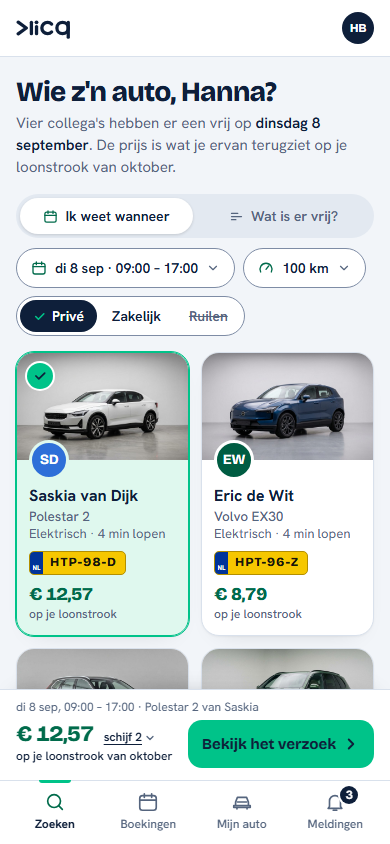
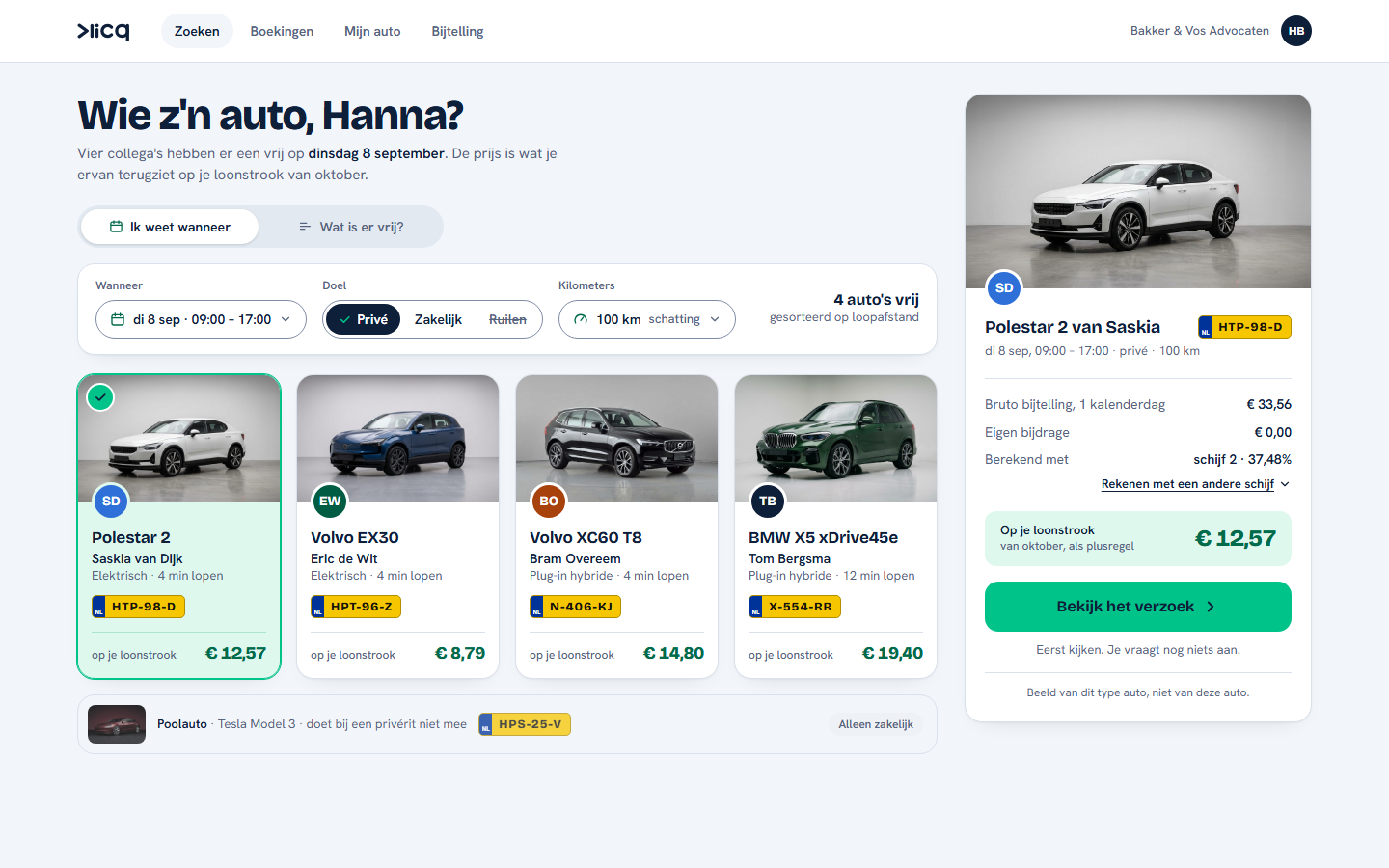
The Klicq search screen: four colleagues have a car available on Tuesday 8 September, each with the price on the payslip, and the pool car for business trips only
Searching in the app: which car is available, and what it costs on the payslip.

One platform for the whole chain.

Making cars available, booking, driving, settling and reporting. One record feeds everything that follows, so nobody enters anything twice.

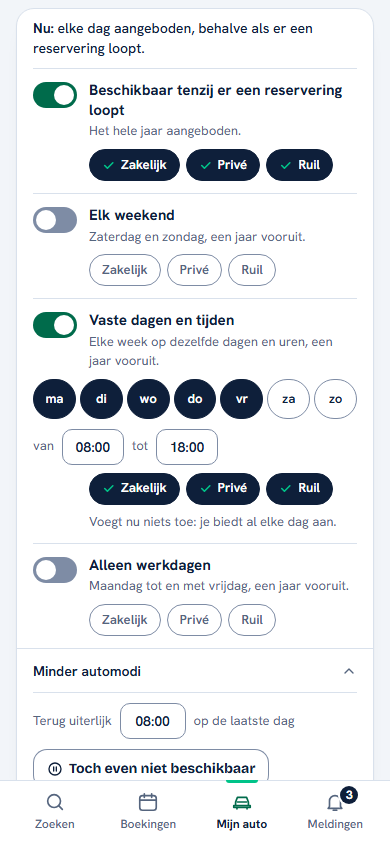
My car in the Klicq app: the driver switches on car modes, such as available unless there is a booking, and chooses per mode business, private or swap
Car modes · set once when the car is free.
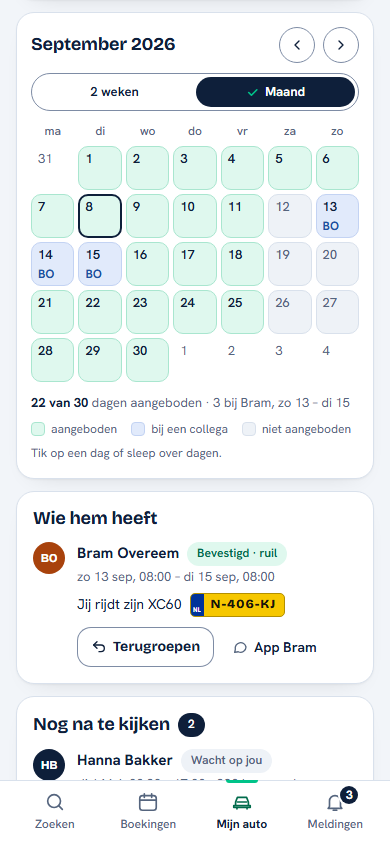
The calendar in the Klicq app: for each day of the month you can see whether the car is offered, with a colleague or unavailable
The calendar · visible per day, and adjustable with a single tap.

Making your car available, without thinking about it.

The driver sets once when their car is free: available unless there is a booking, every weekend, or fixed days and times. For each choice they decide what the car is available for: business, private or swapping. In the calendar they see what is planned each day, and can still close off a single day.

  • Car modes or single days
  • Business, private or swapping
  • Can always be undone
Searching in the Klicq app: four colleagues have a car available on Tuesday 8 September, each with the price on the payslip
Search · which car is available, and what a private trip costs on the payslip.

Booking in the app.

Colleagues search by day and time for an available car and book it with a single tap, with instant confirmation. For a private trip, the cost on the payslip is shown right away. If something has already been agreed verbally, a colleague can also request the car directly from the driver. Sharing is allowed but not required: that depends on your organisation's policy.

  • Search by day and time
  • Ask a colleague directly
  • Web app, iOS and Android
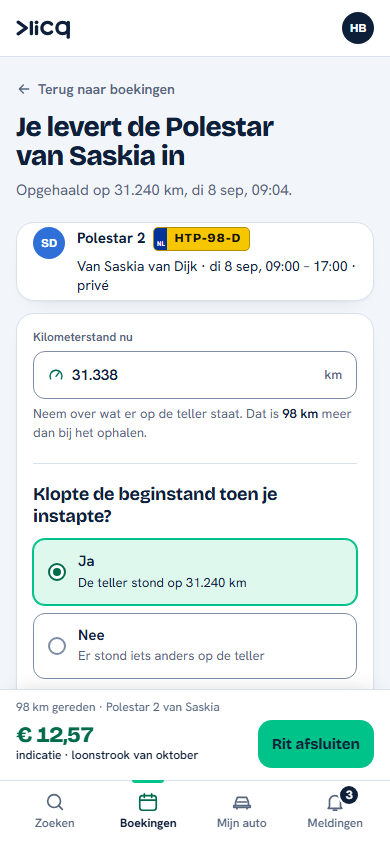
Closing a trip in the Klicq app: entering the Polestar 2's odometer reading and confirming the starting reading was correct
Close a trip · the odometer reading and a few questions at the car, with sample data.

Every shared trip recorded.

Klicq records every shared use: pick-up, return, the odometer readings, business or private, for a business trip the destination, and a damage report if something happened. One record, directly usable for payroll, VAT, reporting and compliance. Closing a trip takes less than 60 seconds. A lease driver's own trips in their own car fall outside Klicq; they stay in their normal trip log.

  • Business and private kept apart
  • Report damage at the car
  • Close in under 60 seconds
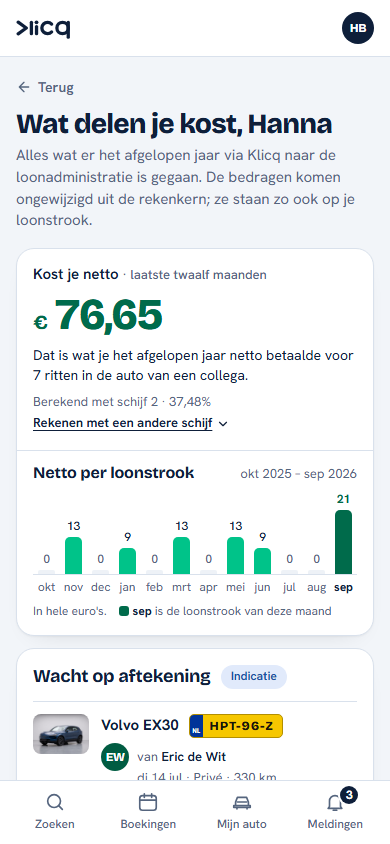
The Taxable benefit screen in the Klicq app: what sharing cost a colleague without a lease car, net, over the past year, per payslip
Taxable benefit · what a colleague sees of the amounts on her payslip, with sample data.

Taxable benefit and contribution, automatic.

Tax processing in line with legislation, case law and current guidelines, fully assured and carried out automatically. As a validated export for your payroll team, or through an integration with your payroll package.

  • Taxable benefit to the day
  • Payroll tax and VAT
  • Export or integration
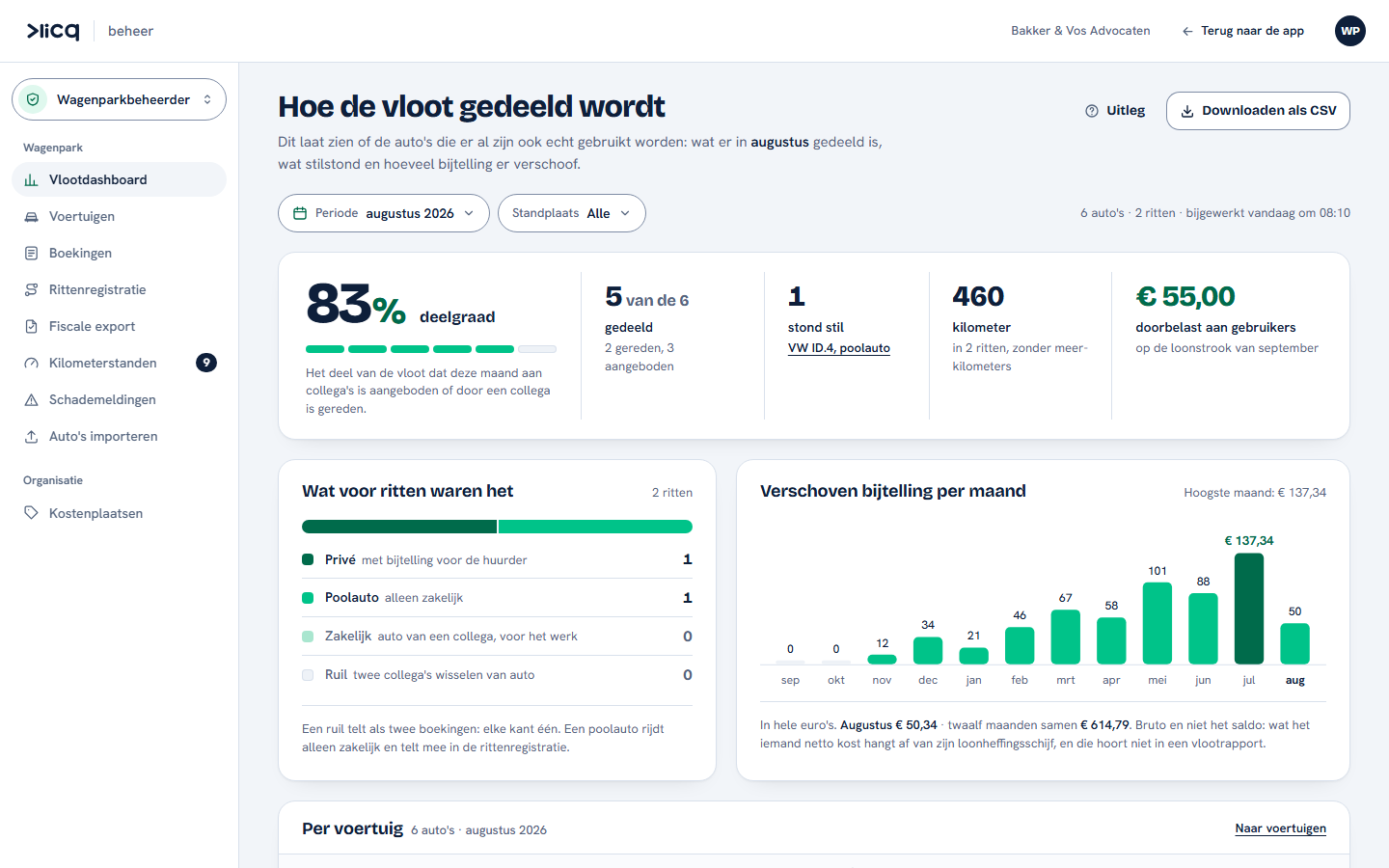
The fleet dashboard in Klicq: the fleet's sharing rate in August, how many cars were shared, what stood idle and how much taxable benefit shifted
Fleet dashboard · the fleet manager's screen, with sample data.

WPM, CO₂ and utilisation.

Klicq is a valuable (partial) source for your mobility data: from input for your WPM and CO₂ reporting to utilisation and savings. You do the reporting; Klicq supplies the underlying trip data, with custom figures on request. From reporting to steering.

  • Input for WPM and CO₂
  • Utilisation per car
  • Custom reports on request

The key: physical today, digital later.

Today the driver hands over the key, or the spare key is kept in a key safe in a central place, for example at reception. That works fine: the booking, the mileage, the taxable benefit and the admin all run automatically through the platform regardless.

Klicq is working on adding the digital key to the platform, so the handover disappears altogether. For this, Klicq builds on the Digital Key standard of the Car Connectivity Consortium (CCC), one standard that works across every brand and every phone. The consortium has more than 300 members, including Apple, Google, Samsung, BMW, Mercedes-Benz, Volkswagen, Ford and Hyundai; the standard already runs on millions of cars worldwide.

This is how it will work once the digital key is available:

  1. Booking confirmed

    As soon as your booking is approved, you automatically receive a digital key in your phone's wallet. As easy as a boarding pass or a loyalty card.

  2. Your phone is the key

    You open and start the car with your phone, via NFC, Bluetooth or ultra-wideband. The key is stored encrypted in your Apple Wallet or Google Wallet and is only valid during your booked period.

  3. Secure and revocable

    Digital keys are cryptographically secured, personal and can be revoked remotely. The owner and the fleet manager always stay in control.

Built on trust.

Klicq processes personal and mobility data. That calls for the highest standards. This is how we approach it.

GDPR
Privacy by design, with a DPIA in the design phase: data is only processed for the purpose for which it was recorded.
Data storage
Hosting in the EU and the Netherlands with ISO 27001-certified providers, encryption of data at rest and in transit, and backups with a tested recovery plan.
SSO
Azure AD, OpenID Connect or Google.
Access
Role-based access control (RBAC) per company.
Penetration test
An independent penetration test is part of the security programme; the results are shared.
Audit trail
Stored unalterably for seven years, because of the statutory retention obligation for tax.
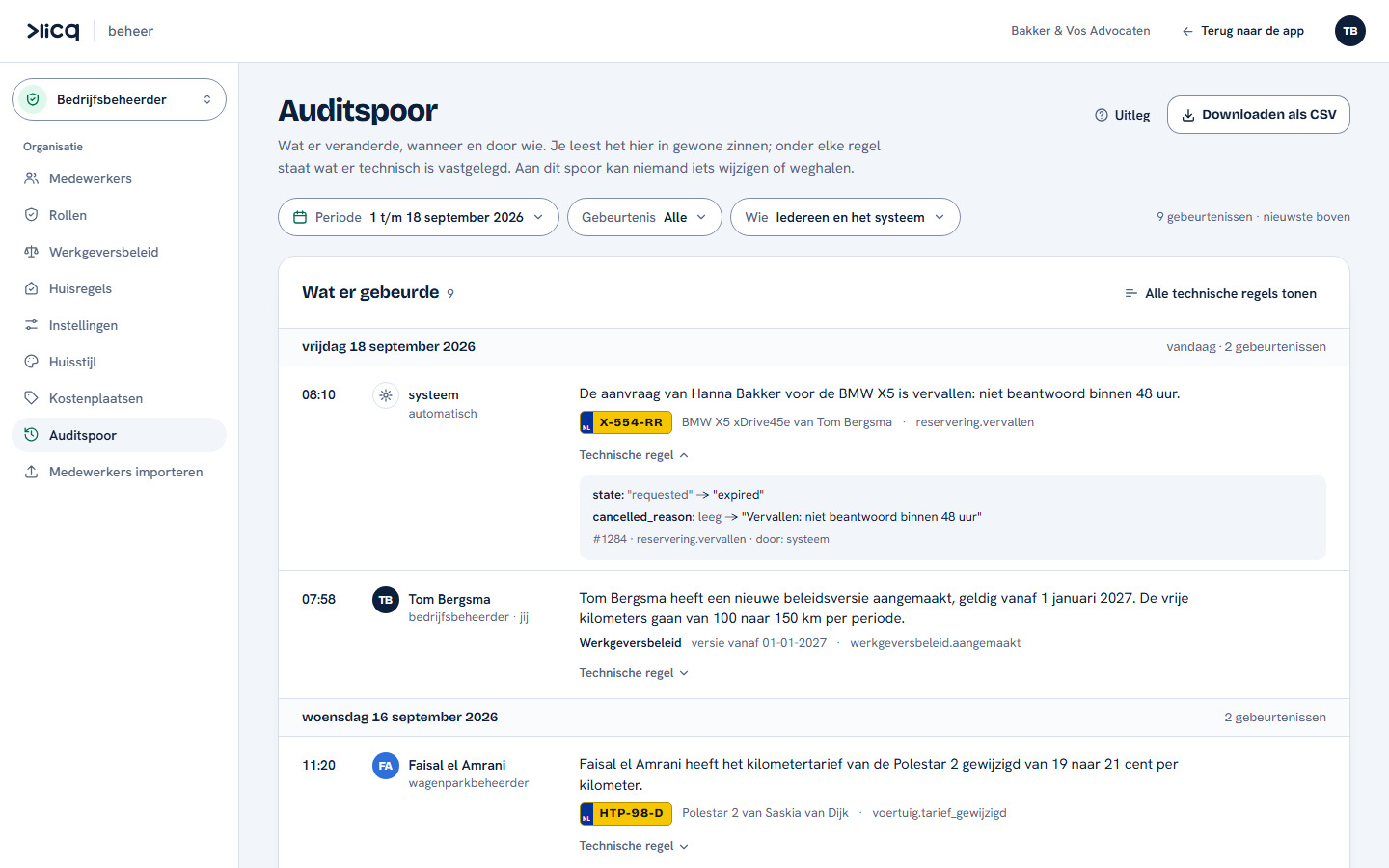
The audit trail in Klicq: per day what changed, when and by whom, in plain sentences with the technical line below
Audit trail · the company administrator's screen, with sample data: what changed, when and by whom.

If it's a yes: this is how we start.

You set up most of the platform yourself. Would you rather hand it over? Then Klicq takes care of the set-up and the training as well. You choose how much guidance you want; that also determines the onboarding in the price.

  1. Set-up: yourself or with us

    After a limited basic set-up by Klicq, you do most of it yourself: vehicles, employees and the sharing policy. Rather hand it over? Then Klicq sets everything up with you, including the integration with your HR or payroll package and SSO.

  2. Training, if you want it

    The Klicq Academy trains your teams in three tracks: HR and payroll (from change to payslip), Finance and accounting (from app to journal entry, audit-proof) and employees and administrators (the app and the dashboards). Your teams do not become tax specialists: Klicq takes away the tax complexity.

  3. Getting started

    We start with the whole fleet and all employees, supported by an outline communication pack that you receive from us. You will find the rates on the employers page.

Want to see the platform in action?

Schedule a demo. We walk you through the app, the dashboard and the tax engine together.